Online mapping has come a long way in the last year. Google Maps entered the field and added satellite imagery to spring itself into the spotlight – challenging the colorful cartoon-like map images of longtime mapping frontrunner Mapquest. The Google Maps API enabled developers to create new applications and mashups, thereby pushing the Google Maps brand to mainstream audiences. Microsoft, Yahoo and others quickly followed.
As popular as Google is, it is not the most well trafficked map service. It is virtually tied with Yahoo Maps (and the new Yahoo Maps beta product which we reviewed here). Comscore says that Google Maps had 19.1 million unique visitors in March, whereas Yahoo had 20 million. Both were dwarfed by Mapquest, with a whopping 46.4 million unique visitors in March, more than Yahoo and Google combined.
In addition to Google Maps, Yahoo Maps and Mapquest, two others, Ask Maps and Microsoft Windows Live Local, also have compelling offerings.
We looked at all five of the current map services and examined their features and performance. Below is a feature by feature comparison.
The best? Yahoo Maps, for many reasons. More below.
Views
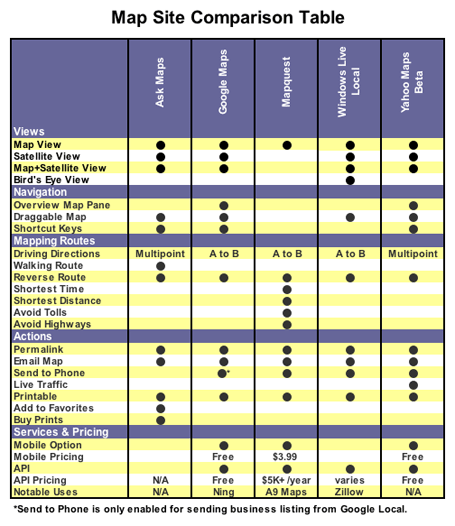
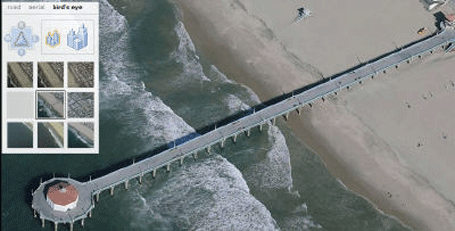
All the major map sites offer two or more different viewing options, including a satellite view, except Mapquest. All the other sites have hybrid views overlaying map information onto a satellite image. Google, Ask and Yahoo also offer a pure satellite image. Windows Live Local boasts one of the more interesting views called bird’s eye view, which adds a 3D dimension to the map image — a sexy feature, though its value lies more in dazzle factor than usability:
Zoom Champion
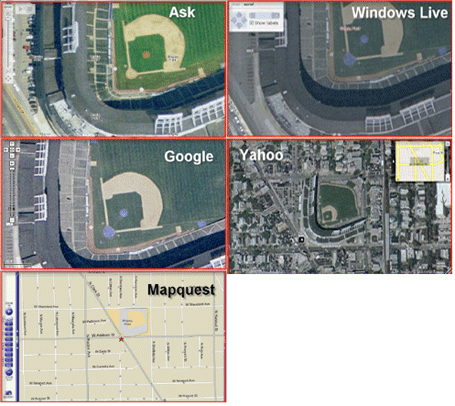
The zoom feature is a recognizable characteristic in most mapping services. Ask, Google and Windows Live Local all tied for the title of “Zoom Champion.” To determine the champ we performed a zoom test which focused on a single landmark and zoomed in as much as the application would allow. We then compared the five zoom levels to see which application allowed us to zoom in the most. Since a picture is worth a thousand words, check out our results below.
User Interface & Features
Yahoo Maps has the best product for obtaining basic driving directions. Its Flash interface offers both multi-point directions and live traffic information. Want the directions sent to your cell phone? Click a button, enter the number and you have them. Yahoo also has a very responsive interface. Taking into account all of these factors, it’s the best for personal use.
Ask Maps allows multipoint directions, and Mapquest will send directions to your phone, but no other service offers both. And Yahoo alone offers live traffic information.
Ask Maps appeared to load a little slower than Yahoo and Google. Ask.com does offer a notable directions feature called Auto-Drive which animates the entire route. Unfortunately, Ask.com was the only service that provided inaccurate directions in our driving directions test.
With Window Live Local the route from point-to-point is not marked with a line like its competitors. This made it difficult to see the actual route. Contrastingly, the service introduces a pushpin feature enabling viewer-determined points on a map. This feature also is a social twist as pushpin points of interest can be saved and shared with others via another feature called a scratch pad.
API
Offering an API has become an invaluable marketing resource. The resulting mashup applications offer free marketing and buzz around a web 2.0 product. Mashups aside, mapping solutions in commercial use can have the same affect.
Google sports the most popular map API and is used in a number of applications such as Ning, CommunityWalk and others.
Google’s API isn’t the best, but it is by far the most used service for mashups.
Expect that to change somewhat over time. Yahoo offers the widest selection of map development APIs (both Flash and Ajax). And recently, Zillow , with its fuzzy number Zestimates, incorporated the relatively new bird’s eye view offered by Windows Live Local via the Virtual Earth API.
Mapquest also has recently featured an open API and even prodded developers to take action by creating a developers challenge contest. Amazon’s A9 Map Beta is a notable Mapquest implementation since it associates street level images with streets on a map to produce a unique mapping experience.
Yahoo is the only service with mapping on web-enabled mobile devices without a download. Google Local Mobile Beta is a free downloadable mapping application, but it does not work on every mobile device or carrier. Mapquest Mobile is a subscription model which starts at $3.99 per month, but access to this service is also contingent on your mobile carrier and device.
Summary
Mapquest is the most popular mapping service but lags on features and usability. Google is the most notable and has a ubiquitous API. Windows Live Local dazzles with its creative views and features but falls short of the others in direction functionality. Mapquest offers a number of features but still is missing satellite imagery, which makes it trail the competitors in core functionality. Ask Maps is a worthy competitor but had the highest error rate of the group.
Overall, Yahoo Maps was by far the best application tested. Its fast Flash interface, multipoint directions, live traffic information, and easy send-to-mobile feature make it the hands down winner. It also features the most robust API options.


I find Yahoo Beta a bit jumpy when zooming, scrolling, so for ease of manipulation I prefer Google Maps. But if I leave home anywhere close to rush hours, will then have to switch to Yahoo Beta for the live traffic info - a lifesaver!
techcrunch is an absolutely amazing resource for information on all of this stuff. thank you for doing all of this work!
I think the Google api is a great idea. I’ve seen a lot of sites using it and adds great content. This is a good review on the mapping services.
Michael. Great Post. One thing to note. yahoo actually does provide the ability to store locations as ‘favourites’.
I have to disagree with what Google Maps brought to the table.
Mapquest had had satellite imagery for quite some time through Globexplorer and it virtually went unnoticed and they stopped providing it. (all that, way before Google maps showed up)
What Google maps really brought is a bigger display, the ability to drag and drop maps, which made for a much needed UI improvement, and open APIs…
Hi Saul, We looked at the Yahoo Maps Beta. Did you mean the current Yahoo Maps site because I am not seeing the “add to favorites” functionality are referring to. I do see “Add to MyYahoo” though.
You did not take into account the scope. Ask covers just USA; Yahoo USA and Canada. I wonder the others…
Disclaimer: I work at Ask, but not on the Maps product…
On the comparison table, Ask Maps doesn’t have a point for ‘Permalink’, but on maps.ask.com, there is a ‘Link to this page’ link. Isn’t this the same thing? Or by permalink, was something else meant?
I’m wondering which company will “natively” provide a topographic layer like the mashup happening in BackCountry Maps (http://www.backcountrymaps.com/). Maybe the perceived audience is not large enough ..
Um, why did you say that Windows Live Local doesn’t have a satellite view in your chart? That isn’t true. Microsoft’s Windows Live Local does indeed offer satellite imagery.
Paul, Thanks for the comment. You are correct, Ask Maps does have a permalink feature which I have used several times. Good catch - we will update the chart.
Also, it’s interesting that very few of Microsoft Local Live’s unique features were mentioned. Like Wifi locate, multiple simultaneous queries, autorefresh of queries, scratchpad, and others.
Robert, The chart is displaying the possible views. You are correct, Windows Live Local does offer satellite imagery however it is a used in a “hybrid view” combining the pure satellite images with a map overlay. I hope that helps to clear up any confusion.
Ahh. OK, sorry about that.
Yahoo “also features the most robust API options”? If you’re really keen on using Flash, sure. Geocoding of addresses is great, but currently limited to the US.
Its API is missing features that google maps has, such as the ability to draw lines.
If any mapping companies are listening: in the API, I would like geocoding, and need the ability to draw lines. As for terms of use, it would be nice to have a pricing that would allow me to not have ads embedded, as well as making maps private (e.g. for use in intranets).
While I’m dreaming, a mapping company that explicitly allowed derivative uses such as placeopedia would be great.
No worries Robert. It is a little misleading at first glance.
How about adding “range” as a criteria? I know google only has North America, Japan, and the UK mapped - I’ll start digging into the others to see if there are any with australia, more of europe, south america, china, india, and so on included.
windows live local definitely offers both naked and labeled aerial imagery. to try it out:
* select ‘Aerial’ in the navigation control.
* If it is your first use, the ‘labels’ checkbox will be on by default
* turn it off and on as you wish. WLL will remember your preference when you exit
Steve Lombardi
Virtual Earth Program Manager
Somewhat surprisingly perhaps, it appears that there are actually people who can use computers who live outside the USA!!!
And even more surprisingly some of us find the fact that Google provides maps for many international cities, and Sat photos of pretty much every large city in the world much more useful than “live traffic” for instance.
Whichever company maps Australia, I’ll jump on their bandwagon.
When you talk about geographic coverage for the mapping sites it is a little confusing. All of these sites reviewed have some level of global support (just zoom out to see). Where you find some differences is when you try to zoom in, geocode or route in various places around the world.
Just to clarify, Yahoo did just last week launch global map coverage at medium resolution. Also included last week was medium resolution geocodeing (city and country) both in the consumer Beta product as well as in the APIs. It’s not perfect, but we feel it is a pretty good start. Give it a try… try to find the metropolis of Clinton, New Zealand.
Jeremy Kreitler
Yahoo! Maps & Local
Andrew, internationalisation is a good point; Australia is served - poorly in comparison to the sites reviewed above - by two main players: the dominant http://www.whereis.com.au and the more international player http://www.multimap.com.au.
Whereis do appear to provide an API, but I’ve never looked into it, and given their history of charging a licence fee for permalinks, I don’t imagine it will be appealing or practical for the kinds of mash-ups we’ve been seeing. To see the Whereis API in action in a commercial environment - and have a laugh at tax-payer dollars at work on such a critical national infrastructure project - check out the “flush-up” of http://www.toiletmap.gov.au. http://www.wotif.com makes use of the multimap API on their maps.
Either way, it will be good to see the services reviewed above expanding beyond N America - well done on a great review, Frank.
i am thinking “map is for what?” GPS seems a cool substitute for online driving direction.
in my view map is much more than “how to go”. with satelite view and APIs, map is bringing you so much fun.
google is doing quite well to encourage smart guys to provide cool applications based on map. I believe, most map impression will not on google site but the API sites in the future.
Geoff,
Regarding whereis - that is the one that I am resigned to using at the moment, but it is not very good. Roads are quite out of date (ref Roe Highway extension, Perth). Also, their web design is atrocious - they really need to bring in some Web2.0 expertise. In fact, all of the Sensis sites are terrible.
At the end of the day, though, I can appreciate that Australia is a small market, and USA and Europe are always going to be better served with this kind of thing.
I believe there is a reason why google API is far more popular than Microsoft and Yahoo APIs. (I believe Mr Scoble talked about it a few months back - although maybe it was someone else):
There is no usgae limit on the Google API. If you have a popular Mash-up and use Yahoo, your site may go down.
Also, Google API has instructions that made it easy for an absolute non-coder like me to add custom maps to my web-site. I found Yahoo’s instructions more confusing (but that may just be me).
Another chime here that many of these services lack decent International coverage. For Switzerland/France I use a different service for driving directions. Yahoo and Google are useless for this.
Separately, Google Earth is the the king for three D maps and adding GPS routes to maps. (Great for cyclists in the Alps) Maybe a niche audience.
Live Local doesn’t work anywhere in the world for me since it doesn’t work on Firefox
Google’s API and smooth dragging is what sets it apart. For me, Mapquest does directions the best, Yahoo has the best integration with their account features and best overall feature list, but Google’s API is what sets it apart. I have built several apps using it and used dozens more. This means I use Google maps more often, and thus I tend to think of them when I need to map something. Why the others don’t spend their time working on their APIs and making them free to use, I don’t know.
Google maps feels very ‘light’ hence where I rush to when I want to map something. Though I like the features that Live offers.
I use Streets and Trips on my laptop if I lose my way on the road.
What do these sites intend to do when gps becomes ubiquitous on cars? I see that Google Earth is trying to tie up with automakers, are the others planning to do something similar?
Frank,
Yahoo Maps beta has the ability to save locations. They don’t call it favourites, but it’s the same concept. Just clikc on the drop down list for any location (starting or ending) and the listing will appear.
Use up to 10 locations anywhere with your Yahoo! ID
For Europe a cool site is mappy.com it can estimate the cost of the trip (tolls, gas) given the type of vehicle you drive as well as various types of routes. Great comparison Frank it’s interesting to compare usage stats with available features. The market ought to be shifting sometime soon!
Why didn’t you include http://www.multimap.com? By far the best if you actually want to find somewhere quickly and easily.
Three issues.
1) The world is not just USA+Canada. It’s really important that Map sites support the whole world. As others have mentioned above, there should be a comparison on geographic scope.
2) How could is the GeoCoding or plain text to address conversion? It feels like Google have a significant lead here. Can you type in an incomplete or slightly inaccurate address and get back what you expect?
3) An extension to 2). Is there a plain text to Lat/Long service available and especially via API. eg Yahoo! have one but it’s USA only. (Doh!)
It’s also worth mentioning http://map.search.ch/index.en.html which in my opinion is where Google got all it’s good ideas. MapsCH also features real time traffic information, next transport times at each stop, journey planning between any transport stops, car park information and so much more. But, of course, it only maps Switzerland.
You didn’t mention the map which is not so widely known but which is my favorite - http://www.map24.com
Denis Krukovsky
http://talkinghub.com/
I also find yahoo beta jumpy too.
Google is very fast compared to it.
What about http://www.map24.com ? No aerial views, but realtime 3D is a nice feature. And it covers North America, Europe, the Middle East, and Brazil.
It is quite heavy, but feels much more like a SatNav system than simple map lookup like maps.google etc.
Just incase there are any other New Zealanders reading, http://www.zoomin.co.nz offers good mapping in a familiar (google-esque) interface, plus other features.
Traffic information? Well, I would prefer map information first.
When I planned my vacation in the US it was nice to be able to use the “GREAT” features by the mapping services.
To some extend you do get a coverage of London. Germany? We are happy to have been provided boundaries of the country.
Satelite view of the world? Nice, for a limited time. Business modells around mapping? Why should a European company use tools and built applications on them when the big players don’t provide the tools for it?`
As with Mapquest, it is an ugly interface but at least it has the data. Looking up hotel information on a map is crucial as are other information.
I was showcased an application on etech for salesforce and one of the supposed key benefits was “integration of google maps!!!”. “we don’t have them over here” was my answer and it took me some time to show them that there was nada niente for me in Google Maps to use with their application.
The US is a limited market, and the world is bigger. Most US companies don’t realize that they miss out on business not so much because they suck but because they make it impossible for non US customers to have business with them. When they answer “but we do no business outside the US!” it is often because of this.
Michael, please do yourself a favour and look up on your stats, how many of your visitors do come from outside of the US and for the future reflect that in your comparisons.
“With Window Live Local the route from point-to-point is not marked with a line like its competitors.”
Actually I think they do, I was just on there last night getting some driving directions and it was drawing a bright green line along the directions route. The biggest problem was with printing, most of the interface widgets didn’t translate to the printer. Something you probably should have included in your review?
Steve: http://local.live.com works fine on Firefox here. What version are you running? What behaviors are you seeing not work?
Nice review, thanks.
The accuracy of the mapping service is only as good as the data. NavTeq is used by Yahoo, Google & Ask, so if a location is wrong on one of these sites, it will be wrong on all of them.
That is a great point Tom!
I have to disagree with Windows Live’s Birds Eye view being “dazzle factor”. Several times recently, I cannot identify most buildings from the roof; and, when I want to meet someone for lunch (or whatever) and I don’t know exactly where the building is (but know what it looks like); Bird’s Eye view is astonishingly useable. I go from “I think that could be it on Google Maps” to “Yes, that certainly it, looking from the West.” on Windows Live.
Satellite views, 3D. etc., are all very pretty. What I want — and all I want — when trying to LOCATE an address and get a ROUTE to or from an address is the address-level automated equivalent of my Rand-McNally Road Atlas. MapQuest does that. Please, MapQuest, do NOT add topography, it will just interfere with my using the maps for what I want from them: Where is it, and how do I get to it.
If I want topography, I’ll ask for it. But I don’t want/need it for where and how.
I prefer Google Maps due to speed, but I have to disagree about the statement saying Windows Live Local’s birdseye view is “questionable.”
When driving in LA or any other built-up area that features extensive mapping, the birdseye view helps find the house, apartment or business you’re looking for. You can see the parking entrances easier or any number of other useful attributes that can’t be readily determined from straight down views. It always helps because you can use it to find & view landmarks when in unfamiliar areas.
It’s the only reason I use Live Local.
Ummm. My non scientific test of Iwo Jima Memorial here in Washington D.C.
Yahoo Maps:
http://maps.yahoo.com/beta/#ma.....&mag=1
Google Maps:
http://maps.google.com/?ll=38......h&om=1
Ask Maps.
http://maps.ask.com/maps?l=lt%.....lington%20(Arlington%20County)%2C%20VA%7Csd%3D0%7Cdm%3D0~#1
Any tips for a yahoomap mashup service?
I use Google Maps a lot more than any other service, but when I actually want driving directions I’ll use Mapquest. I’ve had incorrect directions from Google one too many times to trust them. What’s funny though is that the route drawn on the map is usually correct, so I’ll take a look at it with the satellite view to get a better idea of where I’m going… and then drive there using Mapquest.
I own a flower shop in So. Ca. which is growing so fast that mapping/routing software can’t always keep up. Yahoo is always the most accurate and upto date. I haven’t had an address in a new neighborhood that it couldn’t find. I can’t say the same for MS Streets and Trips, Mapquest, or Google maps.