Google Calendar is Live
by Michael Arrington on April 12, 2006

Google Calendar has officially gone live at calendar.google.com. A tour of Calendar is available here.

Dave Winer may have been the first to write about it on Scripting.com. CNET also has a story.

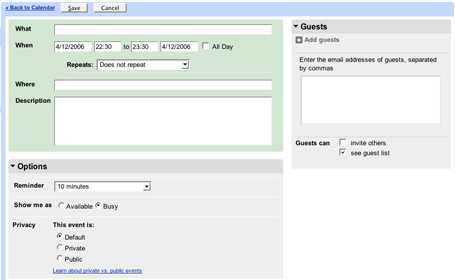
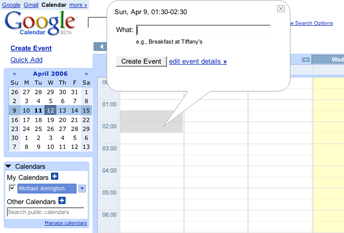
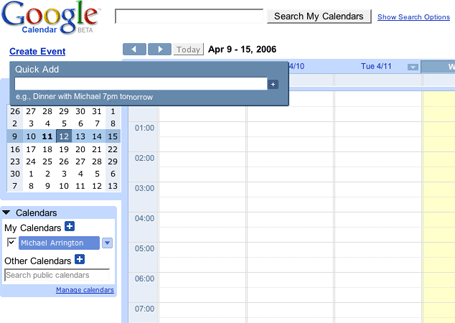
My first impression – It’s fast, slick and stable. Calendar is Ajax driven and, as I mentioned, very fast. Adding an event is as easy as typing “Dinner with Keith tomorrow at 8pm” and Calendar structures the data properly and places a correct calendar entry. This entry can be dragged around the screen to a new day or time.

The Key features:

  • Text recognition – In adding an event, or detecting a new event from Gmail, Calendar automatically detects event-specific words and suggests the adding of a new event with data auto-structured.
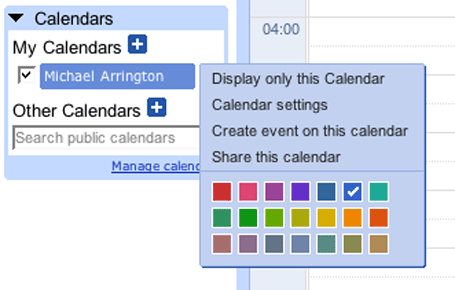
  • Manage Multiple Calendars – set up multiple calendars (work, personal, etc) and view them separately or together.
  • Heavy Gmail integration – Gmail recognizes when messages include event information, so when you get emailed about an event, you can add it to Google Calendar with just a couple clicks. Google Calendar links on the right side of the Gmail page.
  • Sharing – Calendars can be shared with others, and you can subscribe to others’ shared calendars. Read/write permissions can be granted on a per user basis. Calendars can be published via a web page or via RSS, so readers do not need to be on the Google Calendar platform.
  • Importing – You can import events from other calendar programs, including Yahoo Calendar and Microsoft Outlook. Click “Settings,” then “Import Calendar”.
  • Calendar Search

The key driver of Google Calendar is clearly going to be the Gmail integration. For users of Gmail’s web interface, it will be extremely easy to keep track of Calendar items on Google as well.

My overall impression: Excellent. The ability to share via web publishing or RSS shows Google’s commitment to an open stardard. And this application is impressive in its speed and stability.

Screen Shots:
Advertisement

Responses

Comments rss icon

  • Oh it’s live and it is very sweet. I have been experimenting with many web-based calendaring apps lately and this is the best of the bunch. I have tried Calendar Hub, Kiko, HipCal and finally settled with 30 boxes. Im my short time playing around with Google Calendar tonight I can tell that it is more stable and much easier to use then those I mentioned. It was so sweet to import my exported 30boxes events right in. I’m glad this finally launched.

  • I agree, my first impression is that it’s very fast, and it looks like the GMail integration is dynamic, if you have a mail that mentions an event, a check box shows up next to the email to say something along the lines of “Do you want to add this event to Google Calendar?”.

    However the lack of support for Safari, typical of Google, is a killer. I like it, but not enough to change browsers…

  • No Safari support BTW. One small thing that is bugging me is the font selection used to display the time of an event on the calendar. On Mac Firefox it is too small and jagged.

  • Google Calendar is yet another big Google dissapointment. Right off the bat I’m finding fields that aren’t editable (like someone didn’t finish testing the application out beofre they made it live) and a lack of features that every other online calendar have. I’m sticking with my Airset for now.

  • Awesome! I love the interface, very Google like of course. It’s been very easy to use and it’s user friendly too. Everything is right at my fingertips without the interface seeming cluttered.

  • Looks like they are aggregating all the public event info and making it searchable etc. Very cool, and something we suspected.

  • Thanks Mike. I like the fact that events are marked “private” by default–not automatically shared with the world out-of-the box.

  • Is anyone else getting the following message?:

    ”Calendar is unavailable right now, please try again in a few moments”

    or

    Server Error
    The server encountered a temporary error and could not complete your request.

    Even Google has become a victim of the Digg Effect?

    http://www.digg...unching_Tonight

  • Eric – yes, we’re getting that too. Just refresh and it comes back up.

  • I too got those errors Eric. A few moments later, low and behold it’s working.

    I’ve imported my calendar from 30 Boxes to give this baby a shot. Please Google, give us a nice API :)

  • Working for me now…nevermind…though for a second that had this was on a very small server farm and was overloading with traffic or Google took the service offline. I am in now!!

  • Working for me now…nevermind…thought for a second this was on a very small server farm and was overloading with traffic or Google took the service offline. I am in now!! Looks cool.

  • No Tasks!

    Creating new calendars is buggy. I had to sign again to see them.

    Mobile phone notification failed the first time.

    GMail needs a menu to get the calendar.

    Missing public US Holiday Calendar.

    Ok for a public Beta 1.

  • Allow me to drop in RSS ala 30boxes. I loved having my Evoketv.com schedule placed into my calender complete with show descriptions.

  • just a quick comment. seems todo/task not yet ready? it’s an intention of missing or in development schedule?

  • My firs impression is brilliant! Slick interface, very fast, easy to use. I only hope that, in the future, there will be some module with Google Pesonalized! Maybe there is and I overlooked? ;)

  • I think you can access the calendar through iCAL… I’m downloading a patch for MS Outlook 2003 to access the Google Calendar… let’s see if it works.

  • Seems OK, but currently basic. As Joeyfish says, it is missing the obvious: Gmail Integrated? I don’t see an easy way to get from Gmail to Calendar. Am I missing something? Did the Gmail guys forget to activate the link?

    No Tasks?

    Otherwise it’s like having 2 products.

    Steve@Billionaire24.com

  • gcal is looking pretty nice. i’d really like to use it, but my one blocking issue is that I already have my calendar set up in outlook/exchange (through work). sure, I could import my calendar once, but how would I keep everything synchronized? if syncing were easy, they’d have at least one more customer..

  • This is pretty satisfying. Definitely the first usable product from them in a while.

  • Love to be able to see 3 months on one page.

  • Looks like there is heavy lods on calender service and i am not able to access it form India.

  • Wow, I can’t believe that the calendar-wanting, Google following community has reached such a size that it’s brought the Google servers to their knees.

    Impressive.

  • Love this nice service, I was waiting for it!

  • SMS reminders don’t seem to be working.
    Also, SMS reminders appear to be US only (When they do work). A friend in Canada using Rogers pointed that out to me.

    Also, I’m having issues creating new calendars and then being able to see them.
    I logged out and signed-in again and still nothing.

    Finally, I added several items for early next year. Getting to them was not easy.
    Click month forward 9 times or search by day only

  • It’s down as of now, I guess I’ll have to wait.

  • Sticking with AirSet, syncing with my Palm is easy. Testing Backpack. Cool!

  • Cool stuff, thanks for the info.

    I have taken this article on my site linked back to here.

  • Very simple and clean, I like it.

    It’s seems to me that cl2 covered just about all the functionality that users need in a calendar.
    So many features included.

    Really, what more are we going to need?

  • 30boxes is much better! Google, instead of rewarding the innovation made by startups, and keeping the industry alive, prefers a badly designed product.

    Yahoo > MSN > Google

  • Anyone know how to integrate the calendar listings into our site?

    This seems like such an impressive application by the guys in Mountain View.

  • GCal is nice, but I haven’t found a compelling reason to move from 30Boxes. I opted to import my 30Boxes data over as an experiment, but wouldn’t migrate.

  • I notice the lack of setting Beginnning / Ending hour of the day view

  • I’m sticking with my Kiko calendar for now… cleaner UI with less popups, and better support for RSS feed consumption are the killers for me.

  • I don’t mind it. They have a set of links above the big google in the top left for access to gmail which opens it in a new tab. I wonder if they are planning on doing the same for gmail but haven’t pushed it out.

    Overall pretty good….. nothing that really makes you go wow. But being able to intergrate it into your gmail account sure would be a good thing.

  • Hmm… nice, but some obvious – and disappointing, given that wait – flaws.

    1) No visual integration with GMail. I don’t understand the ‘heavy integration’ comment given that, in GMail, there’s not even a link to Calendar

    2) OK, it recognizes invites sent from GMail… but let’s face it, that’s a ‘Doh!’ feature – I mean if it DIDN’T… But try sending an invite to your Gmail account from an Outlook account (I have a corporate email address and use Outlook there). You get an email, with the .ics attachment. No recognition that this is an event and it should activate Calendar. Why oh why does everyone assume we want, or even can, live in their little silo??

    3) an invite sent to that same corporate account hasn’t arrived after several minutes… could be load related, but still…

  • There is something wrong with the timezones. I imported >1000 events from Yahoo Calender and all hours are wrong (8PM becomes 4AM). Day-events like birthdays are shifted one day ahead. It’s probably a minor bug. Overall I like the calendar a lot, can’t wait to fully use it!

  • Can I export the events by using RSS (for use in netvibes, like you can with 30Boxes) without having it indexed and published by google search?

  • Can anyone get the feeds to work??

    I can’t get the public or private XMP or ICAL feeds to work in Netvibes or GOOOLE READER – which sure make it seem like a google problem.

  • Always two steps forward one step backwards.

    Why no ability to add weather for each day – such an obvious calendar RSS feature – like Yahoo has had for YEARS and others like 30 Boxes offer?

  • As of 7 a.m. EDT, the site is saying “Google Calendar is unavailable now” Please try back later.

  • Creating new calendars seems to be down now.

    The draging for events is awesome though. It is much more intuitive than 30 boxes and seems much more powerful. The repeating events are intelligent for instance. I don’t like the lack of tags (or “labels”) and I don’t understand how you can use the Quick Add to add a description to the event.

    No RSS imports is a little rubbish.

    It seems there are a few stages to a Google launch. There is the (optional) pre release of screenshots leaked out a month or so before. Then there is the actual opening of the doors (today). And then (in a few days time) the service will actually start working.

  • woot? you can’t use colors for different events?

    hui, big -

    (or am I blind?) *hope so*

  • the one weird thing is that you can’t have events repeated every other week. pay day, people, pay day!! :)

  • This is EXCELLENT. It’s a fresh change to be able to open up a beta web program and actually use it to it’s full capability and love using it. Depending on integration I will use this in the future. It’s just so simple, quick and easy.

    I’m envious that Google has such a good team. It makes me wish I could make programs this good!

  • Yeah, I agree wholheartedly with the folks above. Not fully integrating Calendar into Mail v1 is silly and value destroying. Silly Google. Silly.

  • Any sign of intergration with Google Desktop’s Calendar?

    That’s my main calendar; it would be nice to see google intergrate two of their products…

  • Without SyncML or other way to get it back and forth from my Treo, I’ll have to stick with Yahoo and Intellisync. It sounds like it will be a long beta period.

  • You mispelled Ability!

    “The ***abilit*** to share via web”

Leave Comment

Commenting Options

Enter your personal information to the left, or sign in with your Facebook account by clicking the button below.

Alternatively, you can create an avatar that will appear whenever you leave a comment on a Gravatar-enabled blog.

Trackback URL
bugbugbugbug
Techcrunch on Facebook