Syndication is undoubtedly the heartbeat of the web 2.0 movement. A feed reader, the most common solution to consuming synidcated content, saves the user time by monitoring countless sites and sources and providing near real-time updates to one location.
There are a number of different types of readers: web-based, desktop, Outlook based, etc… This post is focused solely on web-based feed readers. I’ve included the big guys plus some up and coming readers with outstanding features and/or performance like News Alloy, Gritwire, Attensa and FeedLounge.
All the web-based feed readers reviewed are free except for FeedLounge, which charges $5 per month.
The Web-based Feed Readers
I examined nine web-based feed readers (for previous reviews of each of these, see the TechCrunch Index):
- Attensa Online
- Bloglines
- FeedLounge
- Google Reader
- Gritwire
- News Alloy
- NewsGator Online
- Pluck Web Edition
- Rojo
I did not evaluate MyYahoo, the most widely used web-based reader, or similar products like Live.com, Google IG and Netvibes because these are more virtual desktop applications or portals with RSS reading built in. Heavy RSS users need a more industrial strength application like the ones I have listed above. I believe MyYahoo is a great option for a quick read of your feeds or for on the go feed readers viewing the Internet via cell phone or handheld device, but this service does not have the feature set for a heavy information consumer.
Researching these nine readers further underscores the extremely competitive atmosphere surrounding this industry’s development. On a feature-set basis only, two companies stood out: Rojo and Bloglines.
Google Reader and FeedLounge won my subjective feed-load test, which determines how well the application pulls up a particular feed. The test consisted of loading five feeds and taking the average of the load times and rating the reader on a five-point scale. Interestingly, FeedLounge is the only premium service of the group at $5 a month. Aside from the exceptional performance rating, I wonder what else sets FeedLounge apart from its free competitors. However, many users are religious about readers with a three pane display that FeedLounge, Attensa and Gritwire all offer.
Web 2.0 Features
Rojo, a San Francisco-based company which was reviewed previously on TechCrunch, has the most prominent web 2.0 swagger. News Alloy offers a close second though with itís tagging, rating and other content repositioning (i.e. add to Digg, add to del.icio.us).
User Ratings: Several of the readers offer rating systems, but I think Rojo’s “Mojo” is the most appealing. Mojo, a term reflecting user-generated reviews, mirrors a feature on the popular social news aggregator digg. After entering an item in the feed you can Mojo it to boost its relevance. NewsGator Online also offers a user generated content feature called “Latest Buzz,” which determines and displays the number of people linking to items in NewsGator. News Alloy employs a rating system similar to Rojo that tallies the number of times someone rates an item.
Tagging: Rojo generates a tag cloud from user-generated tags. Google Reader offers the same feature under a different name, “labels.” It seems FeedLounge uses tagging as the sole search and discovery mechanism. News Alloy also allows tagging of posts.
Social Aspects: Rojo and Gritwire feature “contacts,” which adds a social aspect to the reader, allowing a user to share information within a network of contacts.
Feed Discovery & Recommendations: Pluck, a Texas-based social media company, built a feature called FeedFinder into its Web Edition, which improves feed discovery. Rojo recommendations feeds in the top right corner of the layout while you browse.
Up and Coming Readers
Attensa, a Portland-based company, offers a reader that has a very professional and clean interface. While lacking many features the rest of the pack has, it pulls feeds up very quickly. In talking with Matthew Bookspan, Attensa’s Director of Product, I learned Attensa will be launching a new and improved version of the web-based reader that should fare better on the comparison chart. Additionally, Attensa will soon offer a mobile-enabled view of its reader, rendering nicely in handheld devices or cell phones.
Gritwire, a company based just north of Chicago, boasts a Flash-based feed reader that performs very well and offers integrated social networking features similar to Rojo. Gritwire uses a contact-list approach that allows you to share feeds among friends. I spoke with Ian Carswell, Gritwire’s co-founder and COO, who said Gritwire has more web 2.0 features in store, and I am curious to see them in action.
News Alloy, offers an Ajax driven reader with lots of power user bells and whistles. Though it underperformed in the subjective feed-load test Mike reviewed it previously on TechCrunch and found it to be extremely fast in other operations.
Feature Comparison Chart
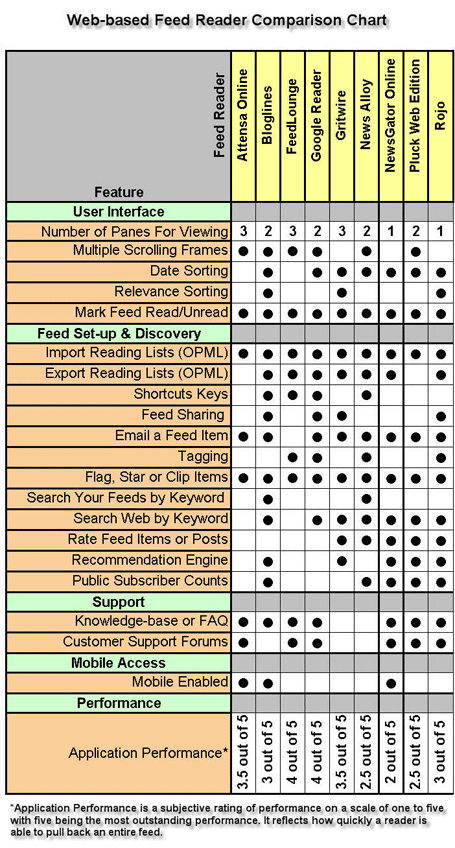
The chart summarizes the research conducted in comparing these readers. I was not able to speak with every company directly so I may have missed some details. Consider this chart a living document to be updated if additional information becomes available. Also, I have left a number of competitors off this chart - there are so many web-based readers and I had to limit research to what I consider the main players in the field.
Summary
If you are looking purely for performance, Google Reader and FeedLounge are the fastest in our tests. Bloglines and Rojo are the best choice if you are looking for a feature rich application (and Rojo blows Bloglines away on “web 2.0″ type features).
None, however, yet approach the speed and agility of the best desktop based readers like NetNewsWire and FeedDemon.
Editor’s Note: Frank Gruber, who writes the excellent blog Somewhat Frank, accepted our offer to write this research piece on TechCrunch. Thank you, Frank.
Update: March 31, 2006 (updates to chart)


See all


I’m incredibly picky when it comes to web UI’s for stuff like this, and I’m a huge fan of C|Net’s underpublicized Newsburst.com - it’s a shame it’s probably not 2.0-ey enough for this list.
Yep, I like Newsburst too. We probably should have added it.
I am all for Bloglines. I loved it the first time I saw it.
I just need a powerful RSS reader that doesn’t nessecary need tagging or those types of Web 2.0 features.
I agree with Jeff. I’ve been using Bloglines for a long time. The only additional feature I really need from Bloglines is the ability to subscribe to password protected feeds. I have to use something else for my Basecamp feeds.
It was my pleasure. I hope you enjoy it!
Great Post. I’m a Google Reader user. Very happy, but I’m also super selective about what I subscribe to. Actually, I’m interested in the niche market being developed around these syndication services. Services like feedrinse are starting to address folks like me who want to be more discerning about what we read, instead of purely relying on the community. I think of my feed as my newspaper. It’s my way of getting the content I care about. I wish the readers would move into that direction. Recommendations and mojo are great, but I’m also smart enough to make my own filtering decisions.
Jeff…If you are looking for the ability to subscribe to password protected feeds you might want to give FeedLounge a whirl - it has the feature. You can get a 3 hour demo to test it out and determine if you like what you see.
Hey, I loved bloglines too. But sometimes it takes multiple seconds to pull up posts when I click on a feed. Also, a three-pane approach is really the way to go.
I use Gregarius (http://www.gregarius.net)
I love it ^_^, the dev community is really nice
(Tagging, public feeds, private feeds, plugins, etc…)
Demo sites here:
http://rss.gregarius.net/
http://gregarius.dropcode.net/demo/
I use regularly netvibes, and this gives me a clear quick view over a lot of news, and the reader user interface looks pretty good for reading.
But I needed to track more feeds as I discovered more web, so I started using a desktop program Feedreader, that has some potential features.
This review over web readers is very insightful, and I should consider again a web reader too.
Hi
may I suggest you take a look at http://www.newsisfree.com/ ?
We have a regular plain html reader and a new shinny Web 2.0 reader with many advanced features…
When did you happen to review NewsGator Online? I ask because it has several features on your list that you indicate it doesn’t like e-mailing a post, clipping, sharing of feeds, and a couple of others
FeedLounge also allows for export to OPML.
Hi Mike - good post. I’m a FeedLounge user and think you missed a couple features on the comparison chart. The features are: Date Sorting (see History link from the interface), Exporting Reading Lists (link in Settings), and shortcut keys.
Oops, sorry Frank, meant to address that last comment to you.
I’m a Google Reader user who isn’t at all selective about the feeds I subscribe to.
I was just wondering if you reviewed Google Reader before or after they introduced their ’sharing’ functionality — the ability to make available to others (either in Google Reader or as an Atom feed) specific labels or starred items, and the ability to make those items available as ‘clips’ to be posted to a blog or something like that. If before, then how does this new feature change your thoughts about the Google Reader? If after … well, I guess I don’t have a question in that case.
Feedlounge is brilliant, shame it’s $5.
Bloglines and Rojo are the kings for now!
Btw, readers of this article may like My
The Perfect RSS Reader Article highlighting the features of the perfect RSS Readers/
@Tony: Bloglines allows it too.
This review was pretty ordinary. Not the comprehensive one that I expected.
I don’t follow too many blogs so I just go to the actual websites. There are things you get by visiting the site that you don’t get with RSS readers (ex: like design of the site).
I am interested what you guys think about Onfolio pre and post Microsoft.
I’m not sure how much time Frank got to spend with FeedLounge since I just got him a login for his review today. That may account for the few errors in the FeedLounge column in the feature comparison chart. As others noted previous:
Export Reading Lists (OPML) - FeedLounge has supported OPML export since early in the alpha release. The download link is available in the Settings dialog.
Shortcut Keys - FeedLounge has *extensive* shortcut keys, including support for arrow keys and the spacebar. There is an FAQ with a full list.
Thanks for including FeedLounge in the comparison.
Thanks Alex…I appreciate the clarification. We’ll have to update the chart since it is a “living document.”
I must say, if you do have access to a web server running PHP, lets you upload files and create/configure your own MySQL-databases, get Reblog. Here’s a mighty article (courtesy of Lifehacker) that shows you how it works, including a video displaying the features.
I’ve skipped Bloglines since I set this up, which took me appx. 10 minutes, all in all.
strongly recommend bloglines! simple and powerfull enough for daily feeds reading, and I am also very comfortble with its current 2 panes view.
Good review, but I am a bit surprised with the results. Google Reader is still horrible broken (you just can’t do some things) and the interface is a nightmare if you subscribe to a lot of feeds. I have tried switching to it a few times and it just drives me crazy every time.
FeedLounge is very nice, but not worth $5 in my opinion.
interesting that Sage (firefox extension) is not on the list. It’s certainly the most convenient, and does it all.
http://sage.mozdev.org/
I want to clarify that we did not examine browser extensions that facilitate feed reading in this post. If we had, Pluck’s IE and Firefox feed reader extensions would have been examined with a dozen others like Sage.
Rojo does support OPML export. I just did it.
The created OPML looks good but does not validate (some texts missing, but I think thats no problem) see yourself: validation of rojo
missing link of last post:
http://validator.opml.org/?url.....jo.com.xml
Also, it should be noted that Bloglines can sync with NetNewsWire! Best feature ever.
Hmmm..you seem to be overlooking the obvious.
Once IE7 is released, the RSS support in IE7 will allow it to jump to the top of the charts.
It simply works “good enough” for the vast majority of people that won’t bother to try something else since it is built-in and handles the basics very well.
Too bad you left out Newsburst from this review. I prefer Newsburst for all its simplicity and clean UI.
Robert…It does appear that things are going that direction. I am more of a Firefox user myself and I pimp the toolbar with live bookmarks for quick and easy access to feeds. However, if I really want to dig through some feeds I use a web-based feed reader instead.
Any open source web based reader code out there, similar to those listed here? On sourceforge I only found some pre-alpha hopefuls.
We’re looking at adding a basic reader to an existing website for our users and would prefer to not start from scratch. If not, would be great to find a developer with direct experience.
What about Omea Reader? Best of them all!
I agree with the other comment on Google Reader’s new sharing function being really killer. I’m amazed the blogerati hasn’t figured it out yet… Not to be hyperbolic, but I think it does qualify as Web 3.0-ish.
In the set up your own category, you missed Gregarius as well as the afore mentioned ReBlog. IMHO, both of them are based on MagpieRSS and IMHO both are acres better than the readers you mention, with the exception of Feedlounge.
But it is hard to build buzz around open source projects that noone is trying to make a business out off.
How about full-text search? I was expecting Google Reader to have it.
Rick, You could take a look at Gregarius and Lylina. I’ve used Gregarius and it is pretty decent.
Speaking of password protection: I really wonder why this feature isn’t widely implemented. Doesn’t nearly everyone want to have a feed of password protected sites? The GMail feed also comes with password protection..
I hacked the password protected gmail feed into bloglines by setting the feed url to
https://gmail_username%40gmail.com:password@mail.google.com/mail/feed/atom
You forgot to discuss cost. Some are free others aren’t. Feedlounge is ok but its three hour tour certainly didnt motivate me to pay when better free products are available.
Personally I think Alesti and bloxor are as good or better than all on your list.
And the Firefox extension readers like Sage are the most convenient.
The one “must have” feature for me is to be able to read the article in the RSS reader (the html) if i want so as to avoid opening too many windows. Thus I find Google, Bloglines and others unusable. But that’s just me.
Regards
Well nice to be competitor to monsters, especially if imagine that NewsAlloy was build by one person in 4 months from a scratch with zero dollar financing but inspired only by its users. And this is with all cool features.
I can prove (with a 5 star rating) it will beat anyone above (
) in speed and features if someone with rich pockets will look at it and spend some bucks into its further developemnt and support. Funny it is from Ukraine (ex USSR) that is far from US (techology mekka)
See you there
I may have missed the reason in the article but wasn’t yahoo included in the reader review?
For Remote Support
The intent was to ask the question of why yahoo was not included in the review. They do more than blogging or having readers as we know, but so does google and they were included.
I may have missed the reason in the article but why wasn’t yahoo included in the reader review?
For Remote Support
I’d like to correct my question. The question is WHY wasn’t yahoo included.
Just curious as the My Yahoo button is on so many blogs and rss feed page sources.
I find online readers to slow. I use Snarfer. Lighting fast! http://www.snarfware.com
don’t forget about http://popurls.com
I saw some… incorrect info on the chart:
1. You can export OPML from NewsGator Online from the “Edit Locations” tab.
2. You can clip items from NewsGator.
3. You can email items from NewsGator.
I only use NewsGator to quickly add feeds to NNW from Camino, so I don’t know much more than that.
Oh yeah, you can also share your feeds from the Edit Locations tab. (go to Blogroll)
FeedLounge is the only one I’ve tried that got me to actually commit and to drop an excellent desktop aggregator (NewsFire). I haven’t found any others that are so fast and do the ‘river of news’ thing so well.
On your “living” comparison chart for NewsGator Online you can add email, clipping and searching as features.
I don’t know how you missed the clipping - as it’s been there for a long time.
Anyhow, a good read - but you know you’ll never win unless you cover the full range of readers out there.
Bloglines does have forums, though not publicized or particularly popular: http://forum.bloglines.com/eve.