
Do not panic. We accept late submissions for TechCrunch50, but please submit soon. »
See What Your Website Visitors Are Doing With Crazy Egg
by Nik Cubrilovic on March 13, 2006

Crazy Egg Logo

Standard web statistic packages compete based on who can offer the most statistics, the most colorful graphs and trying to wrap usability around all that information. The guys at Crazy Egg have taken a different approach where you can measure and actually see what your users are doing when they visit your site, and from these results you can immediately optimize your site based on your visitors usage patterns. The result is that you can learn a lot more about your visitors from a lot less information that is found in analytics packages.

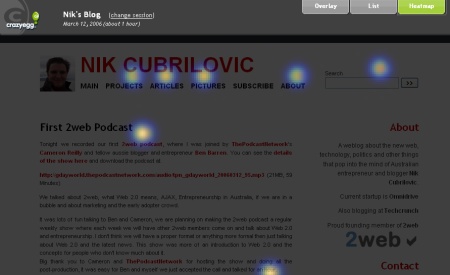
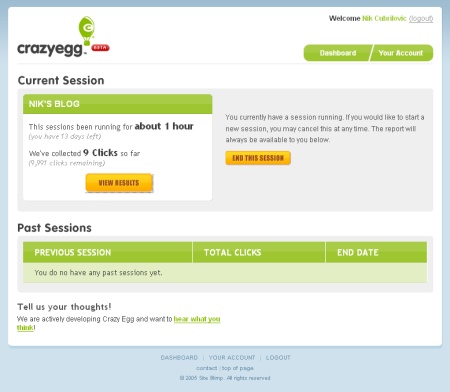
Installing Crazy Egg to track your site is a simple 2 step process, the first step is to tell your app your sites URL, so it can grab a copy of it, and the second step is to insert a javascript code snippet into your site which it will give you. The interface to all this is very simple and intuitive. Once you are setup you wait a few minutes and then the statistics will start flowing back to Crazy Egg. The best way to show what it does, since my words will not do it justice, is with a screenshot
crazy egg heatmap

The above screenshot shows the heat overlay, which is where users are clicking and focusing their attention. Other parts of the application will show you where users click, and how many times.

Crazy Egg plans to launch in April and already has 4000 beta visitors signed up. There will be a free option which will be based on the number of visitors per month (the free option is likely to be up to 5000 visitors) and then paid options if your site has more visitors. Crazy Egg was developed by a team of 5 people based around the USA over the past few months, and the interface for the statistics is all client-side Javascript, with RubyOnRails in the backend. They have been self-funded to date but are exploring funding possibilities as well as potential partnerships (they are looking for distributors).

The aim of Crazy Egg is for webmasters and site owners to learn from visitor usage patterns and improve their site based on what they learn from the application, as opposed to having page after page of statistics. Some features currently in development will allow users to track ad performance so that ad campaigns can be refined, RSS integration and demographic information of your visitors (filtering the map based on which visitors you wish to see).

The competition at the moment has similar services but targeted at large corporations (such as the site optimization services from Atlas), Crazy Egg delivers this kind of technology and tracking ability down to a simple level so that any body can use it and more importantly so that most people can afford it. It is very simple to understand, implement on your site and the results are stunning. Another site promising optimisation tools, probably not as cool as the heat overlay in Crazy Egg, is Map Surface - which is currently in a private beta.

Most site owners now are probably tracking conversion rates and looking at statistics, but when it comes to trying to enhance those results it is often trial and error. This is the situation I have been in for a long time now, but with Crazy Egg I can see what my users are doing and learn from that then optimize my site accordingly.

Pete Cashmore at Mashable also reviewed Crazy Egg a few days ago.
Crazy Egg Screenshot

Responses

Comments rss icon

  • So it’s Google Analytics through the eyes of Sam Fisher ?! LOL!
    Anyway, this is a nice visual improvement over Urchin/Google Analytics.Now instead of just graphs and pie-charts I can see how much warmth my blog/site is generating.

  • Urchin (now Google analytics) has had the site overlay function for years.

    So is crazy egg just a buzzword compliant version of that?

  • Why do screenshots in Techcrunch not show up in FireFox? A shame…

  • uhh, screenshots are working fine for me… (FF 1.5)

  • I wrote the post and I use Firefox and it is fine. You can’t click on them if that is what you are asking, we are considering making a full-sized version available by clicking on images but we just don’t have enough time at the moment

  • This is absolutely awesome! I can’t wait till its launched. Is there any way how we could get involved in beta-testing? We are an internet-marketing company that specializes on financial products and we do a lot of visitor behaviour analysis on our sites. We were thinking about using Atlas before but were not sure if it can justify its costs. My email is jezowicz at gmail if you would be kind enough to include me in the beta. Thanks!

  • This is SOOOOOOOOOOOOOOOOOOO cool ! Thanks for blogging about it ! I have to drop by like 3 times a day to catch up with all the goodies that you’re blogging about ! :)

  • “Why do screenshots in Techcrunch not show up in FireFox? A shame…”

    I’ve noticed when I use Adblock and the Filterset G updater, all images in Techcrunch posts are blocked - even in the feed. Disable it, and it’s fixed - not sure if that’s your problem.

    —-

    Nik,

    I’ve been using CrazyEgg pretty solidly since that review. They haven’t quite got it working smoothly with blogs yet, but they’ve got a range of features and UI improvements in the works that will really take this to the next level. I like it a lot.

  • Like Jon mentioned, in Google Analytics you can currently get the same information, with the same “site overlay” feature included.

  • Next GYM acquistion?

  • Looks like Google Analytics’ new site overlay feature came just in time to compete with this.

  • Thanks for the write up Nik!
    To answer all the people thinking that this is the same as the Google Analytics Site Overlay, check out the things that their Site Overlay does not track.

    http://www.google.com/support/.....amp;type=f

    With Crazy Egg, we are tracking the exact x,y coordinate of a click as well as form fields, submit buttons and other javascript on-click events. Google’s Site Overlay does track these things. We are also trying to display analytics data visually, through our overlay and heatmap to make it easier for everyone to learn and react to where their visitors are clicking.

    If anyone would like more information, just email us at info at crazyegg.com, we’d love to share what we have going on.

  • Correction, I meant so say, Google’s Siteoverlay does NOT track these things…

  • I use Google Analytics and it can sometimes be a little overwhelming. This product feels light a ligther version of websidestory, which is a good thing.

  • I wonder why everything great is in Beta!

  • Does it connect the dots between the visitors and the time spent on the website?

  • Observer, it doesn’t do exactly that yet, but we have some added features in the works that will provide more information about visitors.

  • Check out eyetools.com for something similar, but better.

  • Eyetools.com looks pretty cool, but it expensive.

    Pricing*********************
    Option 1: One-Page Mini Study
    $100 per person/task

    Option 2: Multi-Page Mini Study
    $250 per person/task

    Overall Daniel I would have to disagree with you. Eyetools is for a different audience and not too many people can afford that. Crazy Egg on the other hand is FREE!!!!!

  • Oh dear… It concerns me to see a heat map used to visualise mouse clicks. Displaying click through measurements in a heat map format is using a very false assumption that users are focusing their attention only on areas they click. Crazy Egg: don’t you think it would be better if this information was presented as a label displaying the number of clicks that have gone through associated with the clickable element? This could retain the visual cue by colour coding the label with different shades to represent the relative click through rate.

    Anyway - it’s great to see you challenging the status quo - keep up the good work! :-)

  • Hi Mathew,

    Thanks for the input, we actually have an overlay feature on Crazy Egg and are working to incorporate what you are describing into it. Overall, we are trying to create Crazy Egg in order to help everybody make more sense out of click information.

    We’d love to hear more and even have you test Crazy Egg, feel free to e-mail us at info at crazyegg.com if you’d like.

    Thanks again!

    Aneil

  • Wow, this so incredibly useful. This blog in general is useful. Nice articls, keep up the good work.

  • Nic/Michael:
    I meant to post something about this earlier today. While I find the reviews fascinating and useful, there’s been a few of late (this is one, DabbleDB is the other) where the betas are closed and it isn’t always clear that’s the case on all reviews.

    The reason this is an issue for me is that I’m 5,500 miles away but have an audience where some of these apps/services could be useful.

    It would therefore be helpful to get inside, have a play and provide others with an opportunity to try them out. Less important on something like this perhaps. As it happens I was able to get the DabbleDB people to ‘let me in.’

    In the alternative, if approximate delivery dates could be given as part of the review then at least I could calendarise something.

    With so much going on and so many possible choices, this gets to be important. Thanks.

  • Dennis I mention in the post that they plan to launch in April. We are trying to do a Techcrunch calendar of upcoming launches but it gets hard to have startups to commit to exact dates - these things tend to just launch whenever they are ready. Most of the companies in private beta would be open to having readers take part if you get in touch with them, mabber even asked me to include that in the post (which caused around 10 people to leave a comment with ‘add me!’ because they didn’t bother reading the whole post)

  • Thanks for that Nic - perhaps I should have been a bit clearer.

    1. yes, some respond to email requests but not all (DabbleBD was very good + delat with queries straight away - wetpaint useless - radio silence - Crazy Egg, no email confirmation just online ‘thanks’)
    2. I appreciate launches are movable feasts - where TC could really help would maybe to track these and just ping a quick note saying ‘xx is on the street’ or some such. But I do understand these things are tough to follow when the market’s going crazy with new stuff.

  • I wonder how MapSurface will react to CrazyEgg’s offerings, specifically in its UI. I’m trying to test out MapSurface but couldn’t get the darn thing to work just yet. Hopefully, Glenn can sort it out. Not to mention, I can’t wait to get a hold of a test account w/ CrazyEgg to see it first hand, and see how it measures up w/ MapSurface.

  • Fireclick (www.fireclick.com) has had a tool like this called Site Explorer for > 4 years. what is new?

  • Crazy Egg looks like a useful quick glance tool. Obviously server logs provide more specific data. We will certainly consider using it, but have too much being developed at the moment to focus on implementing it.

  • Clay, Crazy Egg is as easy as 1, 2, 3 - shoot me an email, I’ll explain :-)

  • also cool online service - tracking mouse movements & clicks
    http://www.adgreed.com

  • just seen on mashable that http://www.clickdensity.com has launched. doesnt yet have a free trial but apparently coming soon. How long before all the analytic players get into this?

  • Hi Sheldon,

    Yup, we (www.clickdensity.com) have just launched, a couple of days ago (we’ve been working on this kind of thing since last November!). We’ll hopefully have the free trial up and running within a week (you’ll then be able to sign-up and start using it straight away).

    I think you’re absolutely right - it makes sense for all the big analytics players to get into this, which is why we (and I’d guess crazy egg too) are adding lots of additional cool (and useful!) features that will make us stand out from the usual players.

    Thanks,

    Dan

  • wow! this is a great tool..thx for adversite it!

  • i had use but there is no improve in my adsense click.otherwise.your themes is among the best that i have seen.

  • I run into problems with analytics every day. They either show way too much or not enough. I love the way Crazy Egg keeps it simple while still providing results that actually can help you create a better layout and increase conversion.

  • http://www.JoinCafe.com , professional service for Online Dating and Networking. JoinCafe is a truly free online dating site, and it’s powered by a matching system you invent. Joining takes 60 seconds and the matching starts immediately. Millions of members worldwide, from all walks of life, backgrounds, professions and ages, who are looking for others to share their experiences with. New singles are joining all the time, and many are making connections every day. Meet local singles now! 100% free online dating service for singles. Get out.. meet cool people, have new experiences. Join thousands of smart, sexy singles who are seeking friendship, romance, dating or activity partner just like you. Whether you are looking for just a friend to hang out with, marriage, or a long term relationship, you will be totally free to send and receive mail in an on site mailbox that protects your anonymity. Do extensive searches and Post in the fun Dating forums about issues related to online dating. Are you ready? Join now and Get Connected… with singles for online dating. JoinCafe Online Dating site is fun, fast, free and it works! There are no fees or hidden charges, or gimmicks whatsoever…just 100% FREE online dating! That’s right…free to send mail and receive mail. JoinCafe is a free online dating service that offers free dating online, photo personal ads, matchmaking, free email, dating forums and more. Take control of your love life. Meet by choice, not by chance. Chat with someone special today! Want to join in? Just create a free profile, post up to 5 photos, and soon you’ll be exploring our incredible personals. Online personals couldn’t be easier! You can join to the Online webcam chat, Voice chat, Music video, Free forums, Create blog and clubs, Send gifts all for FREE , instant messaging, and real-time chat. For real relationships, romance, friendships and more, JoinCafe is the place for you. Get started today and find your match!

Leave Comment

Commenting Options

Enter your personal information to the left, or sign in with your Facebook account by clicking the button below.

Alternatively, you can create an avatar that will appear whenever you leave a comment on a Gravatar-enabled blog.

Trackback URL
bugbugbug
The CrunchBoard
  • MediaTemple Logo
  • QuickSprout Logo
  • OpenX Logo
  • Cotendo Logo