New Look, Features for Live.com
by Michael Arrington on March 8, 2006

Live.com rolled out a new toolbar and website feature today, and the site has a somewhat better look and feel. New features include the ability to have multiple pages (a good thing), enhanced search, new themes to choose from and more. Richard MacManus has more details.

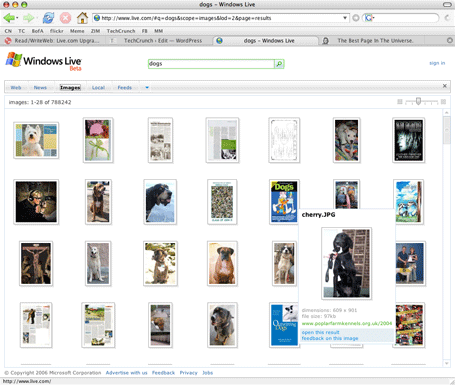
Search has also been significantly enhanced. Live.com clearly has the best image search on the web now (both results and UI). Standard web search is also good – note the “infinite” scroll bar on the right. The only problem is that search is massively slow, and Microsoft needs to fix this problem immediately.

Note to Live.com Team: Hey! How many posts do I have to do on Live.com to get TechCrunch into the default technology feed? :-)
Advertisement

Comments rss icon

  • Very nice, live.com is a lot slicker now. I just migrated from Live! to Google a month or so ago, but I might have to reconsider going back. My only outstanding complaint is that the load time is much too slow. Google’s home page renders so much quicker – which is a huge plus. If MS can beat Google there, they’ll get my eyeballs.

  • Very Neat, yes. Been using google too since a month, just changed back to live again.

  • I wouldn’t mind getting on that default Tech group too – it’d double my subscriber numbers overnight!

  • Richard, stay out of this. I “do” companies and products, you’re the smart analysis guy. :-)

  • I have a Structured Blogging plugin and I’m not afraid to use it… (for reviews, that is) :-)

  • Microsoft is much better than Google! Go MS!

  • My Safari still cannot work on live.com.
    So if anyone want me to use their web site, let my Safari works first.

  • Microsoft will never add TechCrunch to the Live.com technology feed because you write about too many non-Microsoft startups that threaten Microsoft’s plans for borg-like ubiquity. They don’t like to spread the wealth, you know.

    Regarding the new Live.com search, I found it to be intriguing but not very useable. The current method of using search engines is not broken, so why are they trying to fix it?

    Oh, wait… it’s Microsoft, that’s why. They have to be different for the sake of being different!

    And please, folks. Do yourselves a favor and use Netvibes instead as your Ajax home page. It’s the market leader in this space, IMHO.

  • Painfully slow but the image searching is very cool. I’ll consider switching over from Netvibes when they improve the loading times…

  • Geee, the UI of Images is sooooooo slow on scrolling that it is quite unusable… A porn thumbnails pages is faster on my Firefox than Windows Live Image Search. (maybe they plan it for Vista machines…)

    The scrollbar quite unintuive :( and you got smaller page area for content (web 2.0 version of frames?) You see more results per page on Google than on Live…

    The only thing I really like is the font, which is better than google’s. The google font somehow… sucks (and should be smaller).

  • You may stand better chance of being their default tech feed if you didn’t post a screen shot of there site in a FireFox browser on a Mac OS.. LOL.

    I have to admit the image and web search is pretty cool. That is if they can get the speed up to or faster than Google.

  • Brian – ok, that’s pretty funny. Maybe I should have cut that stuff out. :-)

    To MS: I love you, I really do. I just love my Mac more.

  • I don’t know if anyone noticed, but Live.com’s search “infinite scroll bar” doesn’t work the same way in Firefox that it does in IE6. It breaks the back function insofar as it adds a new entry to the back history for each new “scroll”. This led me to have a list of 20 or so identical “back” entries in FF 1.5.0.1. It doesn’t do that in IE6; it works correctly.

  • It’s hard to compete with GoogIe, but I sure am glad that Goggle is not my only choice for decent results, MSN is my 2nd choice (then ASK, Yahoo, A9).

  • i don’T really like microsoft.
    they are just too lame. and always have been

Leave Comment

Commenting Options

Enter your personal information to the left, or sign in with your Facebook account by clicking the button below.

Alternatively, you can create an avatar that will appear whenever you leave a comment on a Gravatar-enabled blog.

Trackback URL
bugbugbugbug
Techcrunch on Facebook