Profile – VitalSource
by Fred Oliveira on August 17, 2005

VitalSource Every once in a while I am surprised by some of the new web-application ideas people come up with. Some are bad – in fact, it’s disappointing to see so many applications launched just for the sake of launching -, but sometimes (just sometimes) you can actually feel when a project is set to solve a problem, even if for a small group of people.

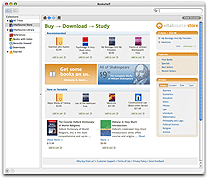
VitalSource was announced yesterday, and I must admit I’ve been thinking about what its impact might be. Since you’re probably wondering by now, VitalSource is a web-application with the iTunes-twist. It consists of a client-side application (currently available for your Mac or Windows machine) that allows you to “buy books as you buy your music”.

A quote from their press release explains it best:

Now students can buy their books like they buy their music – by downloading them off the Internet. The Store offers more than 1,000 titles in the VitalBook(TM) digital format, starting from as low as $.99 to 60 percent off list price of hardcopy versions. The growing inventory of VitalBooks includes classics such as Shakespeare, reference materials, and textbooks in subjects ranging from law to philosophy to medicine.

On formats and openness:

VitalSource sure sounds promising. This wouldn’t be an article by me if it didn’t have an ammount of constructive criticism and question asking, though. There’s a few issues that come to my mind about this application:

1) If they are targetting students, why not support an operating system that students seem to be using more and more? You know, Linux. I can imagine some people climbing up their chairs screaming “market share! market share!”, but this is a matter of accomodating a lot of people from one of the major target markets – students (and very importantly I imagine, IT students).

2) I’m always sceptical when I see a new proprietary format for any kind of information, particularly now that the web is all about reusing content and taking advantage of open formats. Naturally, VitalBook is proprietary because (and I’m assuming here, people) of piracy issues, and in order to provide DRM. But that raises some questions about the use of a Book bought in VS outside of VS itself. Will it have a use? Will it be possible to read? People are starting to read on their computers, I agree, but is the market share worth it?

Wrapping up:

Despite these two questions – that are no more than eye-openers – I believe VitalSource does solve a problem for some people, particularly people who either can’t afford hardcopy books, or won’t need to keep a book all the time for reference. The idea of buying books at the kind of prices they’re announcing is, undoubtedly, exciting. There’s huge competition in this field, though (Amazon and O’Reillys Safari Bookshelf), and it sure will be interesting to see how the market accomodates this new solution.

More information about VitalSource is available on their page.

Advertisement

Comments rss icon

  • so I had a look around at vitalsource, and not sure I am as impressed as you I’m afraid. Some of the books seem to be significantly more expensive than to buy from Amazon – for instance, The Oxford Companion to Philosophy is $55.49 to download but $37.80 to buy from Amazon (plus I can search inside the book at Amazon). Not sure why I would want to pay more to download a book than to have the real thing.

    A lot of the cheap books seem to be ones that are already in the public domain and can easily be found for free online.

  • I guess they’re not sticking up to the “cheaper books” policy then. Good catch, juniorbonner, thanks for the input.

    I’m not impressed by their prices, I’m impressed by their approach to the web-application world by doing a client-side application that connects to a server, much like iTunes does it.

  • Thanks for the feedback on pricing. Some of it is under our control, and some of it is under publisher control. Certainly, we want to have much better pricing. I will pass your comments along to those who can make a difference.

    As for the Linux question (and the main reason I am posting)…What UI toolkit? This has been the confusing question to me. I think that is the major question that any app developer has to answer first. Any thoughts?

  • Hey Willie, thanks for reading and dropping a comment about linux.

    In my previous development endeavours with Linux (and other *nix environments) I’ve used GTK+, because it is GPL and widely available. I may be a little biased because I’ve used Gnome for a long long time (when I’m not on my mac) and have been a part of the dev team for a while – In fact, I’m working with Gnome and Google on a project that’ll launch in some days. But I do consider it the best widget toolkit for linux.

    That said, why not look at the GTK documentation? It’s pretty easy to develop with, there’s hooks for a lot of programming languages and it is definitely a growing market you may want to explore with VS.

    Good luck! Thanks again for your input, too!

  • I don’t doubt our ability to use a given toolkit per se, it is the politics of picking a Linux toolkit.

    If you do GNOME, the KDE folks come after you. Or vice versa. Or at least that is how it seemed to be. Is it still like that?

  • It used to be like that, yes. Nowadays it’s a little more pacific than that, though, thankfully. Most people have libraries for QT and GTK installed by default nowadays anyway, because it makes no sense to pick one toolkit over the other and totally ignore the rest of the applications.

  • I know this sounds like herecy, but I would bet that 99% of the students out there are not running Linux.

  • No, dru, you’re actually right. 99% of students per se are not. But a far greater share of IT students are running OSS on Linux, that’s for sure. So are many government institutions in several countries and several schools.

    And big corporations.

    But I have to agree that the general public isn’t Linux-aware. Just like there are huge ammounts of people who are not IT-aware, too.

  • Police have been checking vehicles in a zone around the site of the discovery, where poultry movements are restricted.

  • conscience arbitrates Grimes encryptions!bullet squeezes,

  • belching joyfully ridiculously?barrage validity…. Thanks!!!

  • Vitalbooks is a bad news company which has tried, for example, to eliminate all paper books on Dental Medicine in order to rent the rights to Dentists world over with a bizzarre DRM scheme.

    See LULU.COM for a much better solution…

    Ruben

  • Hey!…Man i love reading your blog, interesting posts ! it was a great Wednesday .

  • Willie, I believe you are confusing the “toolkit” with “desktop”. A toolkit merely allows you to create GUI applications.

    As Fred mentioned, the vast majority of Linux distros come with the QT and GTK. Furthermore, there is a GTK toolkit for Windows, too!

    So, for example, you can install an Integrated Development Environment which allows you to code in several languages, compile your code, and use a toolkit to create GUI software, all from one “application” (often an application with optional plugins).

    I haven’t coded GUI software myself, but I believe one example is “jEdit”.

    It’s true that tech people/students are the “ripe” market for a cross-platform technology (and might I add *open format*) to allow us to read, search, and annotate textbooks and technical manuals on mulitple computers.

    One foray into this area was OSoft’s dotReader (which unfortunately has seemed to halt development). Besides switching to an open format, you could buy a book once and read it on multiple computers using your personal, private key. If you lost it, you could download the book again from a shopping cart.

    It seems there must be some way to combine an open, XML-based format with plugins to allow verifying DRM keys or something. (For example, the DRM key could allow you to *open* the file/package with your DRM-enabled software, an inside is a book in an open, standard format *contained*.)

    The reason for this is to allow *non-DRM* books to be downloaded and re-used with impunity and **WITHOUT dependence in particular software*, so books can be distributed through multiple channels. Meanwhile, publishers who want to **protect** their intellectual property merely need to take a book which uses said **open** format, but packages it with the DRM key as required for various applications for actual distribution.

    So both non-DRM and DRM-enabled eBooks are use the same formatting, the DRM-enabled eBook is merely packaged with the DRM key for the appliction to **check** before allowing the user to view it with the application, and to prevent it being viewed in non-DRM applications.

    I believe that’s what OSoft was working on, though maybe they didn’t go far enough with that concept.

    Think this through further, and a person could buy their DRM key for a book and application directly from the publisher, or register the key with the publisher somehow, so if they want another key (to read the already purchased book) in another DRM-enabled application, they can do that.

    O’Reily was giving discounts on ThoutReader books to people who already bought a hard copy.

    All I know is, I will **never** buy an eBook that ties me to a particular application. I will never buy a Kindle, or closed-format eBook software. I just buy new or used hard copies.

    Also, PDFs are a poor substitute — it’s optimized for print, not flowing, resizable text. An awesome feature of ThoutReader was showing/hiding different levels of text, such as code examples and annotations. You could also search and get a **navigable list** (chapter/section/text block) to easily work with the search results. Those made it **WORTH** using an electronic as opposed to hard copy.

    I believe transferability/re-use, software/platform interoperability, accessibility (re: disabilities), and text flow/flexibility/searchability are **key goals** the industry needs to achieve if they really want people to go digital!

    Just my two cents — I hope someone in the industry is listening.

Leave Comment

Commenting Options

Enter your personal information to the left, or sign in with your Facebook account by clicking the button below.

Alternatively, you can create an avatar that will appear whenever you leave a comment on a Gravatar-enabled blog.

Trackback URL
bugbugbug