 Company: Jyve
Launched: July 2005
Location: Virtual – people in Silicon Valley, Toronto, Montreal, New York
What is it?
Jyve is a set of applications that enhance Skype. I eventually had to tear myself away from the site because I kept finding new tools and features, but the core functionality can be summarized into four categories:
- Presence-related tools
- Browser Sharing
- Auto Responder
- Call Forwarding
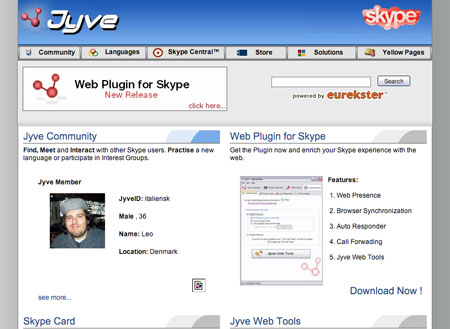
As far as I can tell, Jyve is only available for Windows at this time. To use Jyve’s advanced applications, you must be running Skype v.1.3 or later. There is a small (1.3 mb) download. Here is a breakdown of the applications and what they do:
Presence-Related Tools:
You can view these tools here, and a feature showcase here.
There are a number of code snippets on this page that you can put on a website and allow website visitors to interact with you in different ways. For instance, the button below shows whether or not I am online with Skype, and clicking on it calls me (I’m trusting you people not to abuse this button :-)).

The tools include CallTO (calls), IMTO (sends an instant message), send voicemail, create conference call, etc. These features will be extremely useful on intranets, wiki’s, etc. There is an “all in one” feature that creates a Jyve/Skype Card for you and that contains all of the features.
Browser Sharing:
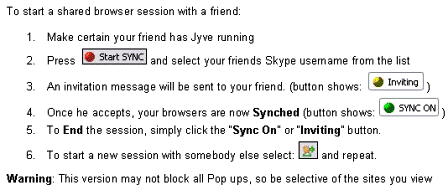 You can use this tool to share a browser screen with other Skype users. None of my contacts are online right now since it’s the middle of the damn night (even the Jyve guys that I’ve been chatting with, Andrew Hansen and Gabe Morris, are offline – wake up so that we can look at TechCrunch together via Jyve! :-)), so I’m making an assumption that it works.
I like this stuff, and I hope that Jyve adds additional productivity tools over time – sharing any application would be perfect. Powerpoint is the obvious one.
Auto-Responder:
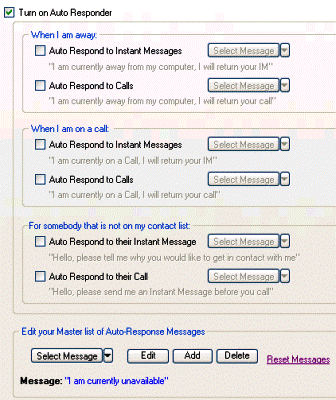 This is a set of options that will leave auto-responses via IM or voice if you are away, on a call, etc. This is useful. But on a sidenote, I’ve come to the conclusion that it is fine if you don’t respond immediately to an IM – many times people are just sending you some information to consider and don’t necessarily want or expect an immediate response. But I digress…
Call Forwarding:
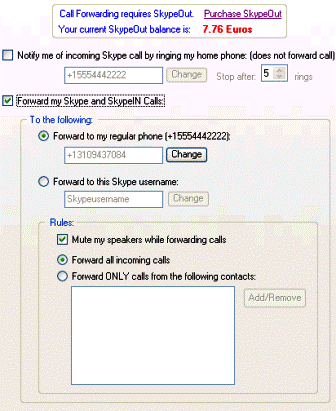
This is the good stuff for me as a user. When a Skype call comes in, you can set it to ring your home phone, forward to a cell phone, or forward to another skype name. Call forwarding requires SkypeOut (a pre-paid thing with skype that allows you to call normal phone numbers). This is really really cool. The only problem is that you must be logged in to Skype for it to work, and the time I most need calls forwarded is when I’m offline. This is a Skype issue, not a Jyve issue, and I’m sure Jyve will change this if/when Skype adds the functionality.
That’s it! Like I said, there is lots of other functionality on the site but this seems to be the main group of applications. For heave Skype users, Jyve is a wonderful product. And it is clear that they intend to evolve these products, and release new ones, in the future.
Additional Links: Tom Keating, Tris Hussey, Stuart Henshall #1, Stuart Henshall #2, Stuart Henshall #3, Stuart Henshall #4, Stuart Henshall #5, Stowe Boyd, 23corner, Fred on Something, Jan in Malaysia, Mobile Weblog, Soul Soup, Neville Hobson, Connected Internet, Solomon’s VOIP World, Bayens.net, Ton’s Interdependent Thoughts