
Editor’s Note: This is a profile of NewsGator’s online product only, not its outlook, feeddemon and other products. There is a natural tendency to view NewsGator Online in comparison to Bloglines, as the products are both very popular and similar in many ways.
Company: NewsGator

Founded: 2003. Acquired Feeddemon in May 2005.
What is it?
This profile reviews only NewsGator’s online product. NewsGator has a number of other popular products, including an Outlook product and the products offered by Feeddemon (recently acquired by NewsGator).
We will probably profile NewsGator’s other products soon. They’ve recently changed their pricing structure, and based on its complexity (and user feedback), we suspect things may be further simplified over time. Today, Nick Bradbury (Feeddemon founder) further changed pricing for his product.
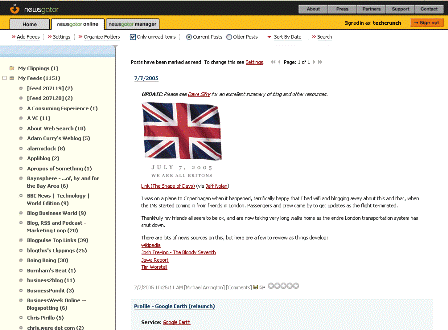
The reason we like the Online edition is that it is not tied to a single computer. You can log in from anywhere. Also, Bloglines is the gold standard of web-based RSS readers, and it is natural to compare and contrast the two services (see our Blogines profile here)
Key Features of NewsGator Online:
– easy import of feeds opml file
– two pane interface – clippings, folders and feeds on the left, content on the right (similar to bloglines)
– alphabetizes feeds
– can view all feeds, or just feeds with new content
– fast updating
– great “clipping” tool to save content with one click
– sorting options includ by date, view older/newer first
– nascent search abilities
NewsGator v. Bloglines:
Bloglines has recently had significant delays in updating feeds – often updating only once a week. That means content comes infrequently and is stale – just the opposite of the core reason for using an RSS reader. Their site is also down quite often (who’s seen the infamous Bloglines Plumber recently?) They are the largest RSS reader (other than Yahoo) (Bloglines accounts for about 30% of Techcrunch subscriptions, NewsGator is a close second), but these problems are leading many users to try out other services.

However, even with its shortcoming, we find that NewsGator Online is not as good as Bloglines (but it’s close).
To test NewsGator, we imported our Bloglines feeds and used it exclusively for a few days. Importing was easy, thanks to the Bloglines export feature and the NewsGator import feature. Snafus are noted below.
Things NewsGator does better than Bloglines:
1. Feeds are updated much more frequently on NewsGator (a very, very important feature).
2. While both services have a “clippings” feature, we found NewsGator’s to be much easier to use – one click. Also, the clippings folder is added to the main directory on the left pane, whereas bloglines has an additional tab to click to view clipped items.
3. If you want a PC or Mac based desktop client, you have the ability to sync feeds with that client so you don’t read the same content twice (Bloglines doesn’t offer a desktop service).
4. NewsGator was never down during our testing period. Bloglines is down frequently.
Things Bloglines does better than NewsGator:
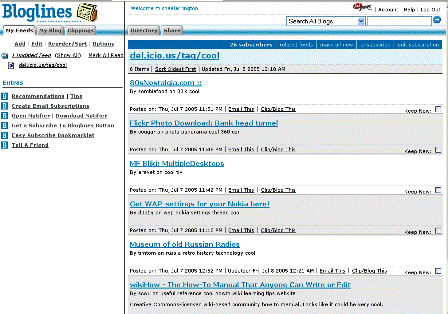
1. Both have two pane interfaces, but Bloglines allows scrolling of the left pane whereas NewsGator doesn’t. This means that you can peruse feeds without losing the content in the right pane. This seems like a small issue, but we found it really annoying when using NewsGator.
2. Bloglines has a “mark all read” feature that clears out all unread content. NewsGator doesn’t have this feature, meaning we had to click on each and every one of our 250+ feeds after importing the opml file to clear out old content. This was a one-time issue, but it certainly got us off on the wrong foot with regard to our NewsGator experience.
3. Both services alphabetize feeds. However, Bloglines disregards “the” before the feedname, and we found it difficult to find the feeds we were used to reading by the name we remembered them by.
4. Bloglines shows the number of subscribers for each feed, and you can view public subscribers. NewsGator doesn’t do this.
5. Bloglines allows you to view public subscriptions of other users (and add them to your own). NewsGator doesn’t have this feature. Bloglines also has a permanent URI for each subscriber’s public feeds. As an example, here are all of my personal feeds on Bloglines.
6. Bloglines has a “keep new” feature for each post that is useful. NewsGator has no equivalent feature.
7. Bloglines has a useful but little known about email feature – you can create an email address and all emails to that address show up as a feed in bloglines. It’s very useful for subscribing to newsletter type emails that you’d rather have in your RSS reader than your email inbox.
Things Both do well:
Both have great user interfaces, options to open content in a new window or the existing window, options for folders to group feeds and good customer service (inquiries about both were answered promptly, within 24 hours even over a weekend).
Neither service has tagging of content, something Rojo (Rojo profile) has, and we’d like to see further experiments in this area.
Summary:
To be honest, we could be happy with either one. But if forced to choose, we choose Bloglines based on features available today. If the feed updating issue isn’t worked out, however, or if we see that damn bloglines plumber more than once a month, things may change quickly.
NewsGator has a good track record of responding quickly to user feedback, and most of the blogines features mentioned here could easily be added to NewsGator.
Finally, we note that with the ease of opml exports of feeds, there is no real lock-in of users, and a newcomer with fresh ideas could easily and quickly gain real market share.
NewsGator Management:
J.B. Holston – CEO and President
Greg Reinacker – CTO and Founder
A.V. “Sandy�? Hamilton – EVP Sales, Marketing and Business Development
Mark Nass – VP of Finance and Administration
Link
Links:
About
Press
Support
NewsGator Blog
Greg Reinacker
Brad Feld on NewsGator Pricing
Nick Bradbury (Feeddemon Founder)
RSS Compendium Blog
Don’t Back Down (“Newsgator is again going on the back burner. Just too many things that don’t work right.”)
Momathome
knowledge jolt with jack
home office voice
Azizi Jennis
Useful Sounds (slow bloglines updates)
Leonid Mamchenkov
Otherwise engaged (bloglines origins)
Fanteja
feednation (a newcomer to think about as an option, with incredible tagging and search options)
Tags: newsgator, bloglines, feeddemon, rss, rssreaders, techcrunch, web2.0, feednation, rojo

























Comment